Payment disbursement profiles enable you to disburse online payments in Bills.
Connect payment services then go to Settings → Digital Payments → Profiles → Disbursements and fill in the required fields:
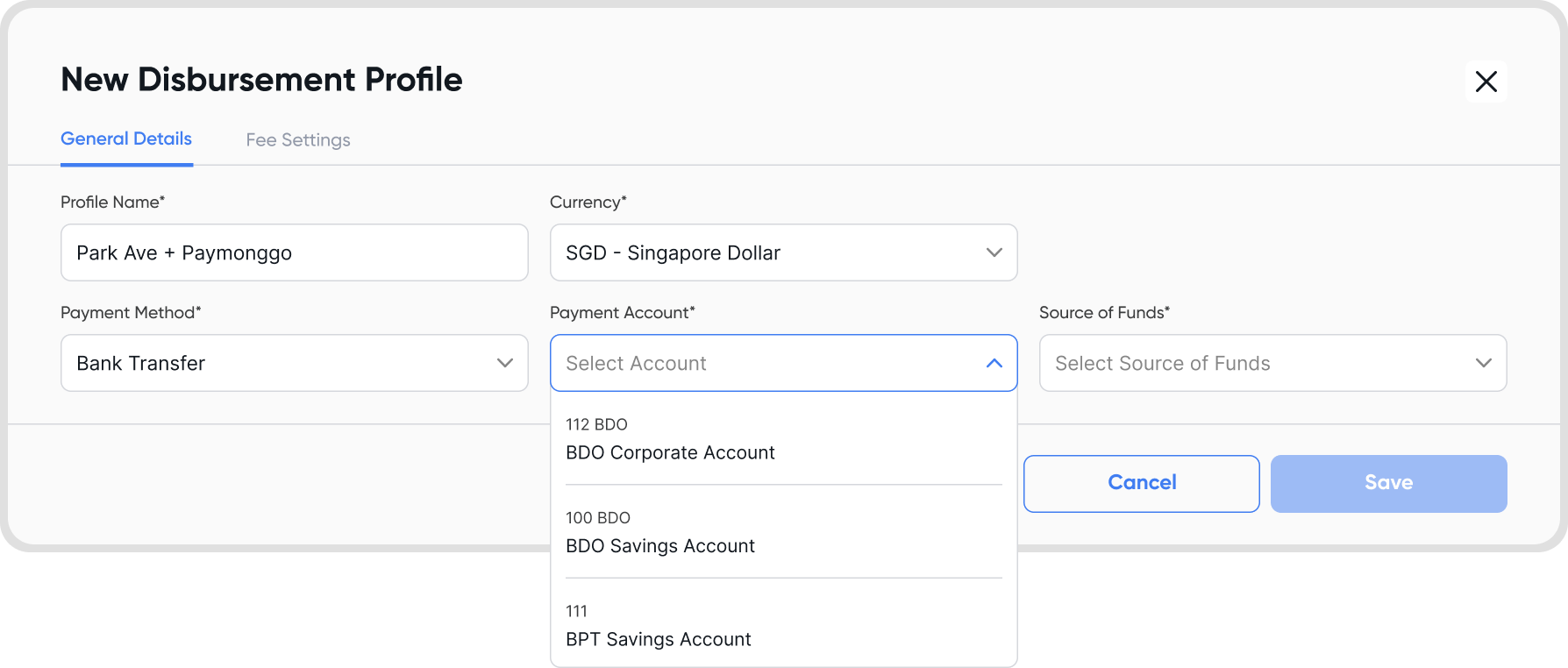
Fill in the general details
Profile Name
Currency
Payment Method
Note: If no payment service with disbursement is set up, no disbursement payment methods will be available.
Payment Account
Source of Funds
Can only choose from payment connections you have setup that allows disbursement service.
Yes. Create multiple disbursement profiles for different use cases.
You can also use a single digital payment connection to create multiple disbursement profiles.
Bills and Bills Payments.
Hover over or click a payment disbursement profile → 3-dot icon → edit
This can happen for two reasons:
You haven’t connected a payment service with disbursement enabled
The connected payment service does not support disbursements
See the list of supported gateways here.
This function is not yet supported. If you’re interested, please reach out to [email protected]
This function is not yet supported. If you’re interested, please reach out to [email protected]
Make sure you’re using a business account (APIs are usually only available for business accounts) and that your payment connection is active.
Refer to disbursing payments from bills guide.
This means that the payment service you connected does not support disbursements. See the list of supported gateways here.
