Sales Quotes are documents sent to customers that outline the estimated cost of a sale.
They include itemized products/services, pricing, and terms, helping customers understand the total cost before committing.
Some common business usage includes:
Providing price estimates before confirming an order
Supporting negotiations on pricing, scope, or terms
Securing customer approval prior to fulfillment
Serving as a reference for creating invoices or sales orders
Documenting agreed pricing for custom or bulk orders
Aligning expectations for project-based or service work
Note: Sales Quotes are issued prior to invoicing.
A sales quote follows a simple flow: Sales Quote → Sales Order → Invoice.
Note: Sales Quotes do not affect your ledger.
A quote in Juan goes through three stages: Pending → Order Due → Active:
Pending: The quote is awaiting customer acceptance
Note: Can be converted directly to a Sales Order or Invoice.
Order Due: The quote is ready for internal processing as a Sales Order
Note: Can be converted directly to an Invoice
Active: Shows all currently active quotes
Each quote stage includes specific statuses that reflect progress:
Pending
Submitted: The quote is waiting for customer approval
Order Due
Accepted: The customer has approved the quote
Partial: Only part of the expected amount has been ordered or invoiced
Example: PHP 500 expected, PHP 250 fulfilled
Active
Includes all Order Due statuses
Full: The expected amount has been fully met or exceeded
Over-fulfillment can be controlled in document settings.
Go to Sales → Orders → Sales Quote → + New Quote
Fill in the required details and Save.
Quote Reference
Quote From
Quote To
Quote Date
Terms
Valid Till
Note: this date cannot be earlier than the quote date.
Item
Importing to bulk create quotes is not yet supported.
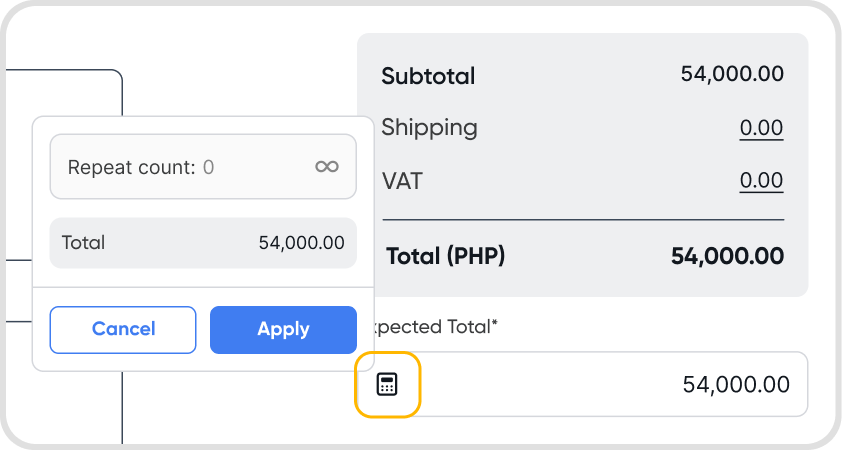
Open a quote in Edit mode → go to the expected total field (below the total table) → click the calculator icon→ set repeat count or set to infinite
You can still edit repeat settings even for active quotes
Yes. Inventory items can be added to sales quotes.
Inventory quantity is only affected once the quote is converted to an order and invoiced.
Note: The QTY field supports up to 4 decimal places.
You can assign Orders permissions in Access Management.
Yes, trial includes 50 orders, quotes, and requests on the Essentials Plan, with the option to purchase an add-on to remove any limits.
Yes, they can be the same depending on how they are used. Both can serve to align with the customer on pricing and terms before completing a sale or issuing an invoice.
Other common terms: Quotation, Quote, Price Quote, Estimate, Sales Estimate, Proposal, Bid
To edit your Sales Quote PDF (e.g., the header), go to Sales Quote PDF.
