The List View is a table where records are displayed. This layout is consistent across features such as Invoices, Bills, Payments, Journals, Contacts, and more.
Yes. Click on a column header to sort the records. Choose between different sorting options.
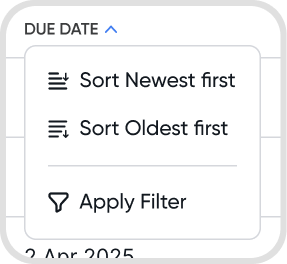
Yes. Some columns support filtering, while others only allow sorting. Available filters may vary depending on the feature.
Use the search bar to quickly find records. You can apply specific queries and search operators to filter results more precisely. Here are some operators you can use to refine your view:
Amount: add currency sign to only search amount columns
Example: $500
Range: specify a range of amounts to view
Example: PHP100-500
Date: specify dates to view using the format “date:” + ”<date search>”
Example: date:last 30 days or date:jan2026
Column: specify keywords in a column using the format “<column name>:” +”<keywords>”
Example: customer:fruit planet or ref:43
Combination: you can combine amount, range, date, and column search queries.
Example: (contact:fruit planet OR contact:quantum) amount:100-500 due:mar2025 sort:date:desc
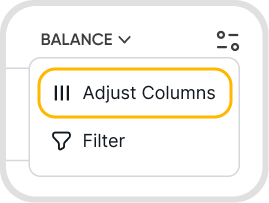
Yes. Click the adjustment icon and select Adjust Columns. This function is available in most List Views, except Deposits, Bank Records, and Fixed Assets.
Yes. Nano Classifiers can be added as columns in the List View for Invoices and Bills.
Tracking Tags can be added as columns in the List View for Invoices, Bills, and Journals.
Tabs are hidden by default if there are no records under that status. For example, if there are no invoices marked “For Approval,” that tab will not appear.
Also, some tabs are permission-based, for example if you only have a Preparer
Select one or more records using the checkboxes. Available actions will appear based on the selected feature. Bulk actions include Quick Fix, void, delete, approve, make inactive, send email and apply payments.
Use the pagination controls at the bottom right of the List View. You can adjust how many records appear per page. Minimum of 50 and a maximum of 500 records can be shown per page.
