Q1. What cash entries are supported for bulk import?
Juan supports cash-ins/outs and cash transfers.
Each import is only limited to 5,000 rows .
Q2. How does cash entry import work?
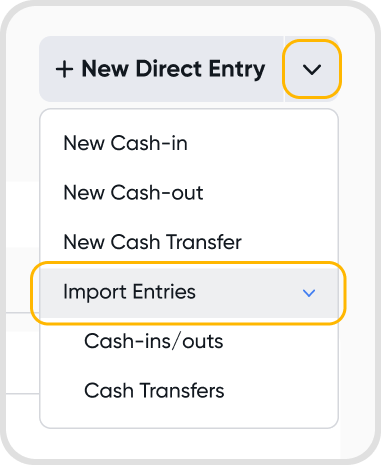
Go to Bank Reconciliation → Cashflows → New Direct Entry → Import Entries (Cash-ins/outs or Cash Transfer).
Choose the entry type to import and download the corresponding template. Fill it out in Excel and upload the completed file. Maximum 5 MB per import.
For cash-ins/outs:
Rows belonging to the same journal must share the same Reference. Type, Contact, and Date must also match across all rows.
Each journal must include at least one Bank or Cash account line.
Review all instructions in the Excel workbook before importing.
For cash transfers:
Each row imports as one cash transfer. Transfer From and Transfer To must be different Bank or Cash accounts.
Cash-out Amount is in the Transfer From account's currency. Cash-in Amount is in the Transfer To account's currency.
Review all instructions in the Excel workbook before importing.
After uploading:
Juan will display a review screen before finalizing the import.
Rows with errors are flagged and excluded from the import. Only valid rows will be imported.
Confirm the import to post the eligible entries.