Hover over or click a request → click the 3-dot icon → choose edit.
Quick fix is not yet supported for requests.
The bulk edit option only appears when the request has 2 or more line items.
Select the checkboxes for the line items you want to edit, or select the header checkbox to select all items.
Click Bulk Edit to update any field on the selected line items.
Hover over a request → click the 3-dot icon → choose duplicate.
Go to Drafts → Hover over or click a request → click the 3-dot icon > Delete
You can also bulk delete by selecting multiple requests using the checkboxes.
Note: Only Draft requests can be deleted. If a request is Pending or Active, it can only be voided.
Open a Pending request and click View Actions → Accept
You can also bulk accept by selecting multiple requests via checkbox and choosing Accept.
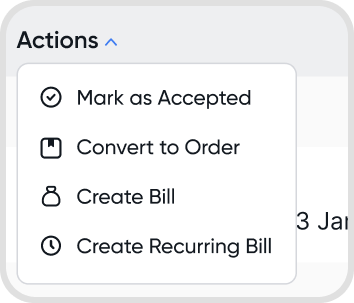
Hover over or click a request > click the 3-dot icon > select Void
You can also bulk void by selecting multiple requests via checkboxes.
There are associated orders linked to the request that must be voided first.
A Purchase Order is automatically created from the request.
A Bill is also generated from the same request.
If the Purchase request is set to repeat, only the first bill will be created.
Yes. Use the Convert to Order action to convert the request to a purchase order.
Yes. You can link a request to a purchase order that already exists, instead of converting the request into a new order.
Open the request, click View Actions, and select the purchase order from the dropdown.
Contact: only purchase orders with the same contact as the request appear in the dropdown.
Order status: you can link any active purchase order, such as Pending, For Review, or Confirmed.
You can link multiple purchase orders to one request, and the linked total can exceed the request’s expected amount.
If the total of the linked orders is less than the request’s expected amount, the request status changes to Partial.
Note: Linking is only available from the request. You cannot link a request from inside a purchase order.
No. A request can only be linked to a purchase order, and the purchase order can then be linked to a bill.
To create a bill straight from a request, convert the request into a bill instead. This creates both a purchase order and a bill from the request. See Q9.
No. Once a request and a purchase order are linked, the link cannot be removed.
To undo it, void the linked records in order:
Bills: void any bills linked to the purchase order
Purchase order: void the purchase order
You can then link the request to a different order or convert it into a new one.
Yes. You can turn into an order or bill an amount lower than the expected amount in the purchase request.
Multiple bills can come from one request when there are several orders linked to the request.
The remaining amount can still be fulfilled through an order. Once it’s fulfilled, the Partial status becomes Full.
Yes. You can still edit details in a fulfilled request. However, changes made to the request will not affect linked orders.
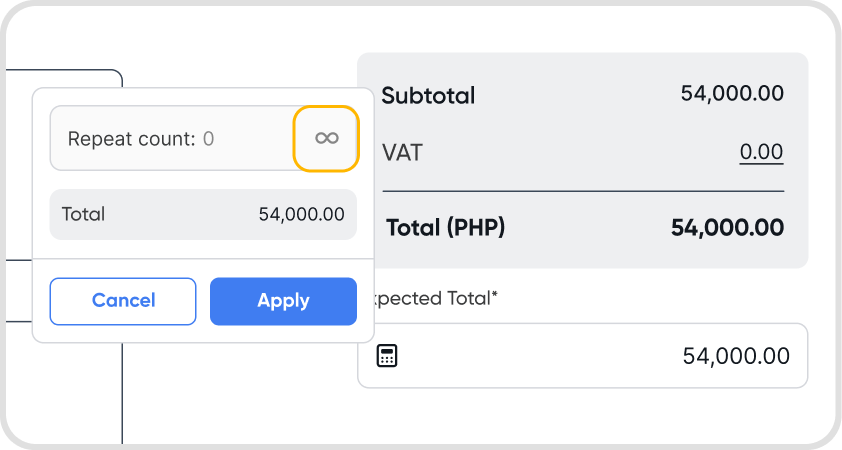
Yes. Open a request in Edit mode → go to the expected total field (below the total table) → click the calculator icon→ set repeat count or set to infinite.
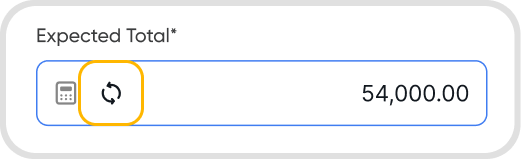
In Edit mode, click the reset icon beside the expected total to clear the repeat count.
No. A repeating request does not generate new requests or consume a new sequence.
It remains in a partial status until the expected amount is fully converted into an order.
Open a request and in the summary modal, all related orders to your request are listed.
Possible reasons for this change:
Related order amounts were reduced below the expected request total
The request amount was edited, increasing the expected total above the linked orders
Related orders were voided, reducing fulfillment and reverting the status to Partial or Accepted
No. Voiding an order does not delete the purchase request. It only affects the request’s fulfillment status, not the request itself.
