
Q1. What is a Customer Statement?
A Customer Statement gives a clean overview of a contact's transactions and outstanding balances within a selected period.
It's available as both a PDF and an Excel (.xlsx) file.
Q2. How do I download a Customer Statement?
Go to Contacts → Select a Contact → Download Icon → Customer Statement → Choose a period
This generates two files: a PDF and an .xlsx file, both covering the selected period.
Q3. What is the 'Statement of Accounts' in the Customer Statement?
Shows currency-wise activity for the selected period. Transactions in different currencies (e.g. PHP, USD) are shown in separate sections.
Each currency section starts with an opening balance: the balance due from outside the selected period.
Lists all invoices, payments made against invoices, credit notes, and refunds that fall within the selected period.

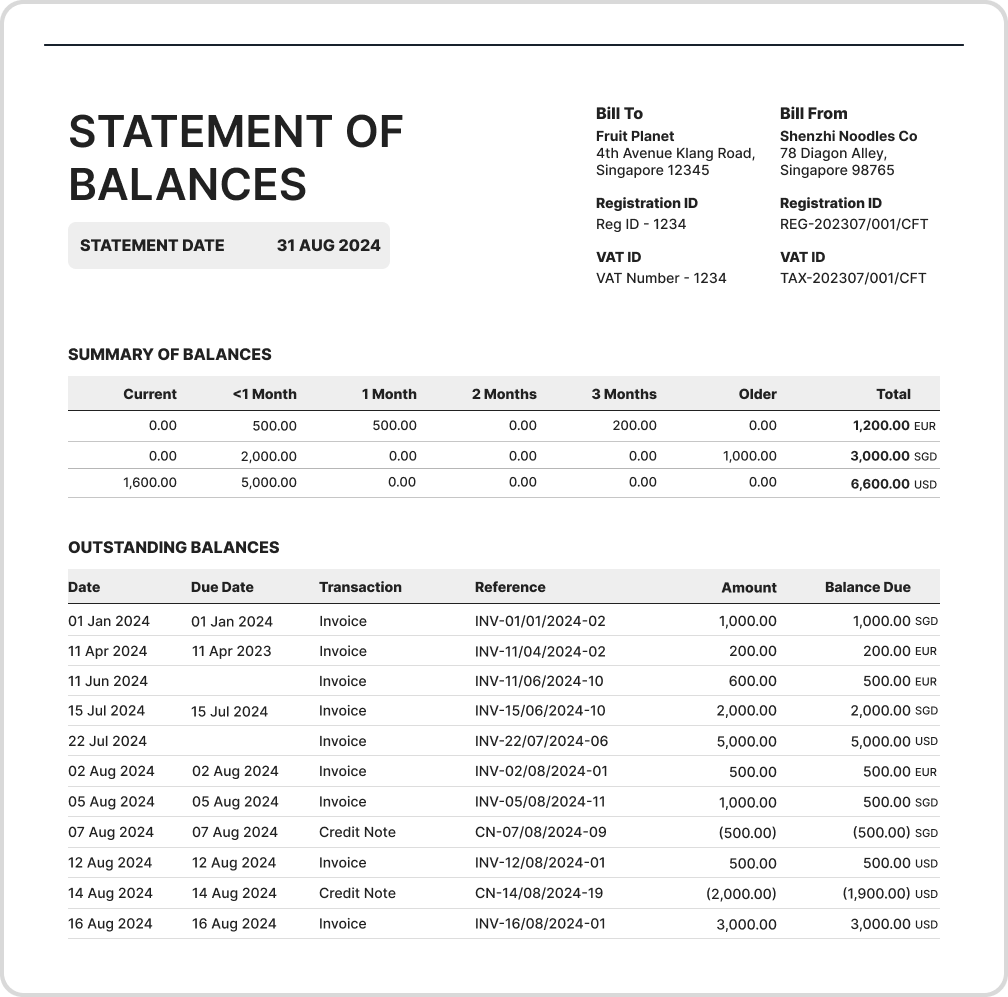
Q4. What is the 'Statement of Balances' in the Customer Statement?
Gives a quick overview of total outstanding balances for each currency.
The Summary of Balances table breaks down outstanding balances into aging periods.
The Outstanding Balances table lists all outstanding invoices and unapplied or partially applied credit notes, along with their original amount and balance due.
Note: The Statement of Balances only appears in the PDF. It is not included in the .xlsx file.
Q5. Will I see transactions in their original currencies?
Yes. Regardless of the contact's default currency, all transactions appear in their original currency in the Customer Statement.
Q6. Can I email a Customer Statement to a contact?
Go to Contacts → Select a Contact → Email Icon → Send
The Customer Statement is attached to the email automatically.
Q7. Can I bulk send Customer Statements?
Select the contacts you want to send statements to.
Choose Send Email from the bulk actions menu.